Introducing Thunder Bird Webmail
Thunder Bird Webmail is a Chrome and Edge extension backed by a local Rust mail service. It combines a Thunderbird-style three-pane mailbox with IMAP, POP3 and SMTP support, local-first security controls, inbox cleanup reports, weekly email metrics, and an MCP server for AI-assisted mail workflows.
Thunder Bird Webmail is a local-first webmail client packaged as a Chrome and Edge extension. The extension provides the interface; a small Rust backend on your own computer talks to IMAP, POP3 and SMTP servers. There is no hosted mail service in the middle, and mailbox passwords are kept only in the backend's memory while the account is unlocked.
The interface follows the classic three-pane mail-client layout: accounts and folders on the left, messages in the middle, and the selected message on the right.
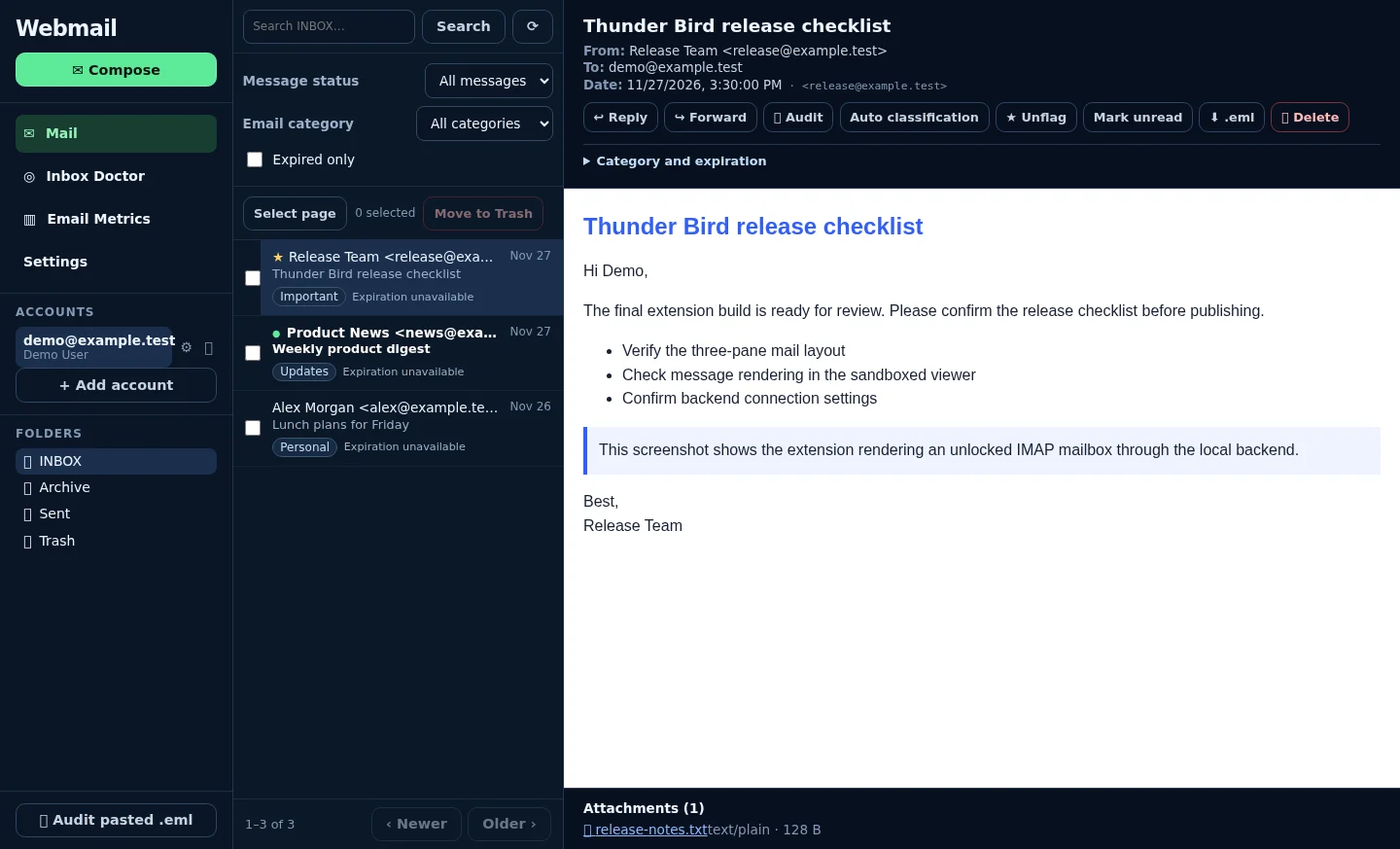
What it does
The extension is a working mail client rather than only a viewer:
- Read and search IMAP mailboxes, open attachments, download original
.emlfiles, reply, forward, compose and send through SMTP. - Connect POP3 accounts in compatibility mode. POP3 supports unlocking the account, listing the inbox and reading messages; actions that need server-side state, such as flags and moving messages, are hidden or refused.
- Save server profiles, add multiple accounts, choose IMAP or POP3, and configure ports and connection security from the connect screen.
- Flag messages, mark them read or unread, move them to Trash, prepare a trash archive before emptying it, or discard the operation.
- Write signatures, including multipart signatures and embedded images.
- Use
mailto:links through an extension context-menu action.
HTML mail is rendered inside a nested sandboxed frame. Remote images are not loaded directly by the extension; when they are enabled for a message, the backend fetches them through a guarded proxy.
Organizing mail
Thunder Bird includes a retention and categorization layer. Messages can be assigned categories such as personal, important, updates, marketing or verification. A category can carry an expiration period, making it easier to find mail that should not live in the inbox forever.
Sender rules apply a category to future mail from the same sender. There is also optional automatic classification through a locally running Ollama model, so categorization can use a local model rather than an external AI service.
Inbox Doctor and Email Metrics
Inbox Doctor audits a mailbox or an uploaded mail export and produces cleanup-oriented reports. It groups sender identities, measures message volume and storage, detects subscription signals, and creates recommendations about what to keep, archive or unsubscribe from. Reports can be downloaded as a standalone HTML report, CSV worklists and a Markdown briefing.
Email Metrics turns repeated audits into a timeline. It tracks message counts and storage by sender domain, distinguishes ad hoc audits from scheduled ones, and can run a weekly seven-day audit when the backend is running and the account is unlocked.
An MCP server for mail
The repository also includes mail-mcp, a Model Context Protocol server. Once an account is unlocked in the extension, an MCP client such as Claude Code or Claude Desktop can use tools to read, search, send, categorize and trash mail through the local backend.
The MCP server stores no credentials and has no independent access to the mailbox. It only proxies to accounts already unlocked in the backend, and destructive operations are explicit. Mail content returned by the tools is labelled as untrusted data, since email can contain prompt-injection text.
Local-first security model
The security boundary is intentionally narrow:
- The backend listens only on loopback, normally
127.0.0.1:48101. - Mailbox passwords are memory-only. Restarting the backend locks every account; non-secret server profiles and settings may persist.
- The extension id is pinned by the manifest key, and the backend accepts state-changing browser requests only from allowed extension origins.
- Host-header and
Sec-Fetch-Sitechecks limit loopback attacks and cross-site requests. - The extension uses a restrictive Manifest V3 content-security policy and can connect only to loopback backend addresses.
- Email HTML runs in a sandbox. Downloads include hardening headers, and remote-image fetches validate redirects, content type, size and public IP targets.
- Request bodies, uploads, archive expansion and individual protocol messages have size limits.
This does not make the application immune to malicious email or a compromised machine, but it avoids the much larger exposure of putting the mailbox behind a remote web service.
How it is built
The extension is a Manifest V3 React application built with Vite. The backend is a Rust workspace using Axum, with separate crates for mail protocols, core mail logic, the HTTP API, Inbox Doctor and the MCP server. Blocking IMAP, POP3 and SMTP work is isolated from async request handling.
The test suite uses fake IMAP, POP3 and SMTP servers, golden-data parity checks against the original Python implementation, backend integration tests, extension unit tests, and end-to-end tests that load the real extension in headless Chrome. The documented test matrix covers normal mail operations, security guards, downloads, trash workflows, Inbox Doctor and the MCP protocol.
Trying it
-
Clone the repository.
-
Build the extension:
cd src/extension npm install npm run build:extension -
Start the backend in another terminal:
cd src
./run-backend.sh
On Windows, use
run-backend.batorrun-backend.ps1instead. -
Open
chrome://extensionsoredge://extensions, enable Developer mode, choose Load unpacked, and selectsrc/extension/dist. -
Click the extension icon, add an account, and unlock it with the mailbox password or app password.
The project is still young. Real mail-provider and real OAuth-provider configurations need more field testing, and Microsoft Edge itself has not yet had the same end-to-end coverage as Chrome. Those caveats aside, the core architecture is already in place: a browser-native mail UI, a local Rust mail engine, inbox analytics, and an agent interface that never has to hold your password.